The Toniebox is one of those devices that makes a fairly complicated interaction feel simple. Put a figure on top, and a story starts. Squeeze an ear to adjust the volume. Tap a side to change chapters. For a child, there is no file browser, no remote, and no reason to think about what is happening underneath.
That simplicity is what made me curious. What was inside the box? How did the figure know which story to play? And could I keep the experience I liked while making the player work on my terms?
The Toniebox reverse-engineering community had already made an impressive amount of hardware and software knowledge available. I used that foundation as a starting point, examined the stock firmware on my own box, and worked with Codex using GPT-6.1 Terra to build an offline player around a different product idea. The result brings together tap-and-lift cards, familiar physical controls, per-recording progress, and fast local playback on the original hardware.
I reduced one recorded media scan from about 30.3 seconds to 13 milliseconds by moving index preparation to the computer and changing how the firmware looks up recordings. That is a reduction of approximately 99.96% in that scan stage. A subsequent seek-index change reduced a saved-position seek from about 2.9 seconds to 55 milliseconds in another device run, an improvement of approximately 98%. These are individual component observations from different runs, not a measurement of the entire tap-to-audio experience.
The interesting part was not just getting code onto an ESP32. It was deciding which parts of the original experience to preserve, where the existing implementations made different choices, and how to turn the evidence from a compiled firmware image into a player that felt intentional to use.
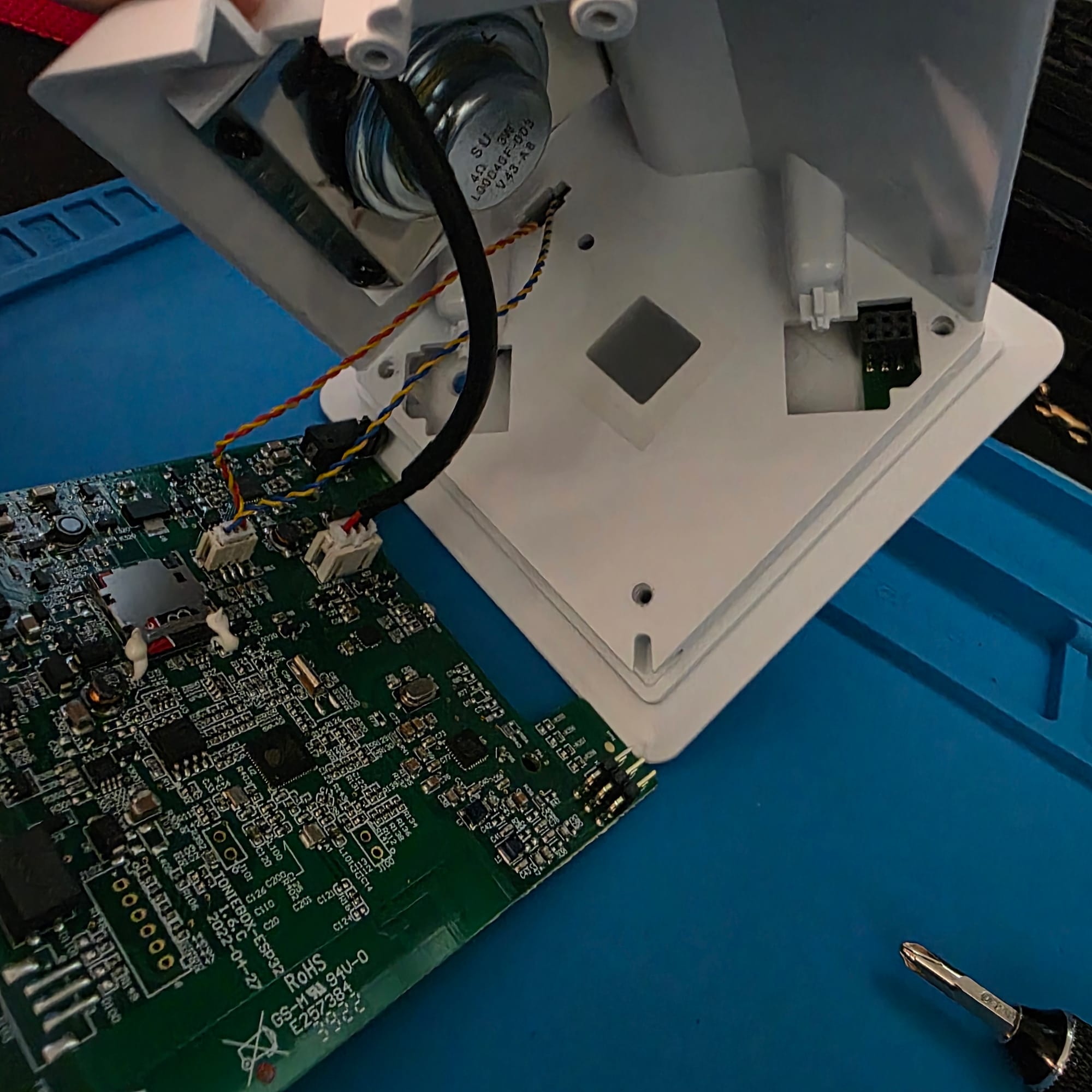
Inside my Toniebox before the serial and SD-card modifications.
First, Understanding the Box
My unit is a Toniebox 1 with a board marked TONIEBOX-ESP32 1.6.C, an ESP32-S3, an internal microSD card, a 3.6 V nominal Ni-MH battery pack, a speaker, and a headphone jack. The board also has hardware for reading NFC tags and detecting motion. The ears and speaker have their own connections. A header connects the main board to the upper assembly and matters for the built-in reader.
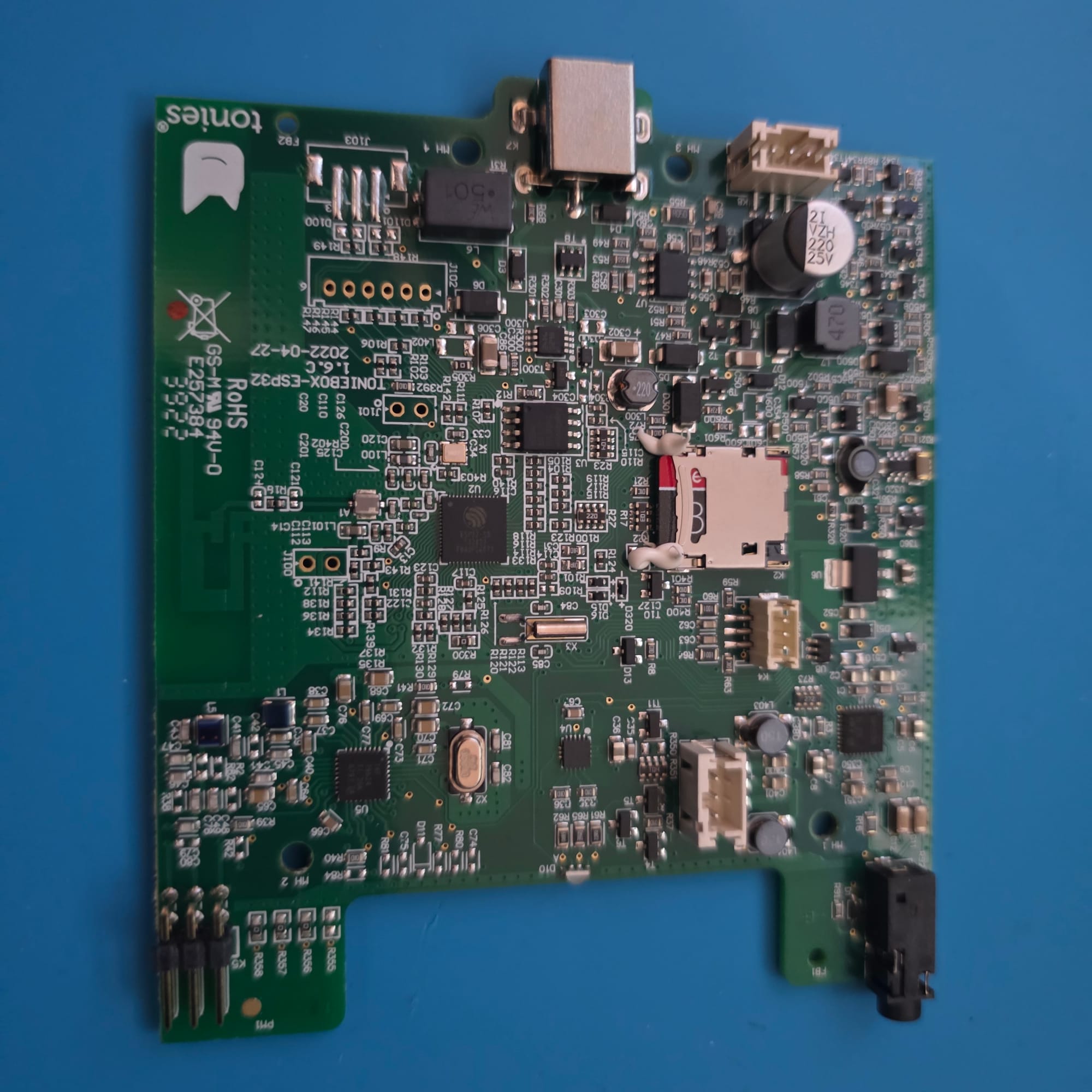
The board revision matters. Details found for a different Toniebox generation are useful leads, but they are not automatically a wiring diagram for this one.
I was not starting from zero. The Toniebox reverse-engineering community has documented the hardware, protocols, audio format, and ways to use your own content. The team's 37C3 presentation, in German, is a useful tour of the components and research. Gambrius Tech's introduction to Toniebox hacking shows how much is already possible with community tools, including custom audio on the SD card.
Those resources helped me identify the building blocks. My engineering question was how to combine and extend them into a self-contained player with the interaction, performance, and security properties I wanted.
What Happens When a Tonie Meets the Cloud?
The community's protocol analysis describes a system in which the box reads a tag and uses locally cached content when it is available. When it needs to retrieve content, it communicates with Tonie's service over HTTPS. The box has a client certificate and corresponding private key for its identity, and uses tag-related information to authorize a content request. Audio is delivered in the Tonie audio format (TAF), which contains Ogg/Opus audio and chapter information.
That description is intentionally high-level. The private key is a secret and should not appear in a post, repository, or screenshot. A certificate authenticates a device in that interaction, while the tag-related information has a different role. A network request is not required for every play. The SD card can hold previously obtained content.
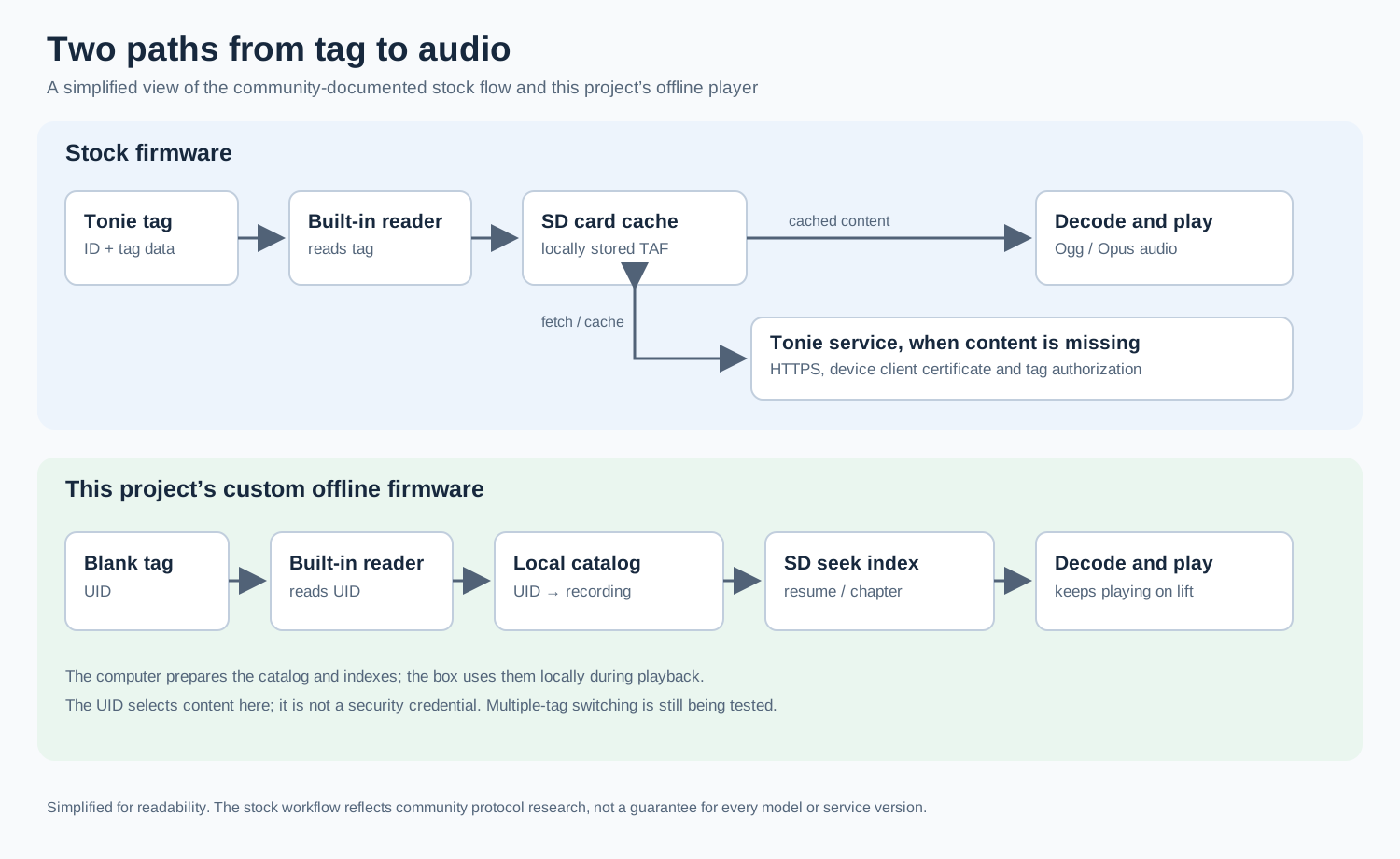
The upper path summarizes community-documented stock behavior. The lower path is my project’s current approach.
The community has several ways to change the experience. Teddy and TeddyBench provide tools for working with Toniebox content and SD cards. teddyCloud provides an alternative server path for the stock firmware. TeddyBox provides an ESP32 firmware implementation and valuable hardware references. I could use those projects to understand what was possible, then make different choices in my own firmware where the interaction I wanted called for them.
One example is the TeddyBox reader flow I examined. It starts playback when a tag appears and stops it when the tag disappears. I wanted a card to act as a selection, so my player keeps the recording playing when the card is lifted. That changes the product's behavior and its reader state machine.
Why Build an Offline Player?
My goal was a little different from reproducing the original workflow. I wanted to put my own artwork on cards, associate a compatible tag with each recording, tap a card on the box, and then lift it while the story continues. I also wanted the box to remember progress and keep the controls familiar enough to use without a manual.
Keeping this version offline was a deliberate security and privacy choice. The player does not need an active cloud connection or service credentials to select and play its prepared local library. That narrows the interfaces and dependencies I need to manage while keeping the original device credentials protected separately.
The ESP32 also leaves room for a separate future project. I could connect the box to home automations. Starting with a self-contained player gives me a clear boundary for deciding later what should be exposed and how it should be secured.
Getting a Baseline Before Changing Anything
The first challenge was communicating with the board. I connected a 3.3 V DSD Tech USB-to-TTL adapter to the Toniebox's serial contacts. The box stayed on its own battery. The adapter supplied serial signals and ground rather than powering it.
With J100 bridged at startup, the ESP32-S3 enters its ROM download mode. I read the full 8 MB flash twice and checked that the two dumps had matching hashes. I also preserved the original SD card. That gave me a stable reference for the investigation and a way to compare the installed firmware with the original image.
To make repeated firmware iterations easier, I extended the boot-jumper and serial connections and added a microSD extender. That made it possible to enter download mode and access the card without repeatedly taking the whole box apart. The end goal is to mount the extender at the bottom of the enclosure, as shown below, so the card stays easy to reach alongside the charging opening.
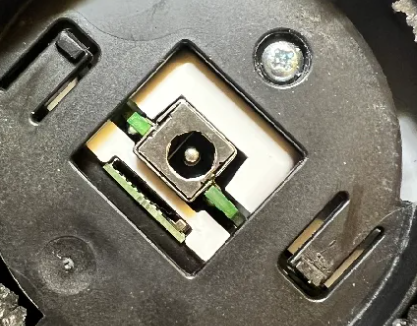
The intended mounting arrangement provides access to the microSD card from the bottom of the box.
From a Firmware Dump to Engineering Decisions
A firmware dump is compiled machine code, not the manufacturer's source tree. The community projects gave me tools, libraries, and hardware references. I extended my investigation by taking the stock binary itself into Ghidra and using PyGhidra and custom scripts to follow specific behavior through the image.
I made 5,015 recognized functions in the selected stock application searchable by identifying the image in the flash layout, wrapping it for analysis, and directing a scripted Ghidra decompilation sweep. That gave me a way to follow call paths around SD initialization, the audio codec, NFC, motion, and power. I could then compare the original firmware with the public projects, component datasheets, and behavior on my board.
For example, tracing the original ear-volume handler led to the tone dispatcher and the codec's hardware beep generator. That gave me concrete frequencies and timing to recreate familiar feedback. Looking at the stock ADC setup also exposed an inconsistency between configuration and calibration in my battery-reading code. Aligning those settings produced internally consistent readings. In both cases, the useful contribution was the path from a specific product behavior to a board-level implementation decision.
esptool provided the ROM-loader interface for reading, writing, and verifying the device. The ESP32 development tools built the replacement application. I also built targeted host-side checks around parsing, decoding, seeking, and control logic. I then used serial logs and the physical box to connect those results to the real hardware.
I compared the public implementations, the stock binary, and my board's behavior. That let me use existing knowledge where it fit and investigate the gaps that mattered to this design.
The First Sound Was Not the Finish Line
The initial goal was deliberately small. I set NFC aside and focused on playing a known recording from the SD card through the original speaker. The first attempts were silent. Eventually the recording played, but it was very quiet. Then pressing an ear stopped playback.
I traced the codec, output routing, and power-control sequence using TeddyBox and the stock firmware as references. After correcting the power behavior, I could change the volume without stopping the player. I tested the headphone jack separately. Both sides played, and the speaker took over again when I unplugged the headphones.
Then came the details that make the device feel like a Toniebox. I wanted the familiar startup sound, green light, and volume feedback back. I used stock sounds I had identified as suitable and added my own short cues for selecting the next and previous recordings. A charging cue and pulsing green light followed. A red shutdown indication and chosen cue make it clear when the box is turning off.
The light is part of that product language too. Blue gives immediate feedback while a recording is being selected. Green indicates playback, and a pulsing green light accompanies charging. A low-battery indication and shutdown cue let the player communicate its state without a screen.
Product Design Is Part of the Engineering
Adding more controls to two ears sounds easy until the new gesture makes an old one feel broken. I tried a double press of the large ear for the next recording. It made quick volume presses feel unresponsive, which was a good reminder that a feature can pass a software check and still be a worse interaction.
The arrangement that worked better for me has these controls.
- Tap either ear for volume, with feedback.
- Hold the larger or smaller ear to select the next or previous recording, with a cue.
- Briefly press both ears to pause or resume. Hold both to restart or, with a longer hold, shut down.
- Double-tap the left or right side for the previous or next chapter. Tilt left or right to seek through a recording.
- Place a mapped tag on the box to select its recording, then lift it while playback continues.
The chapter gesture brought another product decision. Should a single tap be enough? A single tap could make the interaction easier to trigger and avoid requiring the sensor to recognize a pair. But it would also make an accidental bump more likely to change the story. Since children are likely to touch and move the box, I chose to keep the double tap and work on recognizing it reliably. That decision defines what the firmware should optimize for, not just which sensor event it can detect.
I evaluated the side gestures with the board seated in the enclosure because the sensor experiences a tap through the assembled product. Left and right double taps selected the expected chapter directions, while a single tap left the story playing. The enclosure, the sensor, and the interaction design were all part of the same decision.
The player also shuts down after inactivity and leaves a finished recording at the end instead of automatically starting another one. Those choices keep the box predictable for the person listening.
The 30-Second Card Tap
The first white ISO 15693 test card successfully selected a sample recording, and the story continued when I lifted the card. That was the interaction I wanted. It was also slow. An early selection involved roughly a 30-second media lookup, long enough to make the box feel as if it had stopped responding.
I optimized the lookup by moving work from the box to the computer. A local catalog associates a tag UID with a recording. Computer-built indexes identify useful positions in the Ogg/Opus data so the player can find a chapter or a saved position without scanning the entire recording each time. The seek implementation checks the relevant page information and gives the decoder some preceding audio to establish context. Fallback behavior is available when a usable index is unavailable, but that path can be slower.
After the first index change, two on-device media scans took 13 ms, compared with approximately 30.3 to 30.6 seconds in earlier runs. That is roughly a 99.96% reduction in the measured scan stage. The saved-position seek still took about 2.9 to 3.2 seconds, so I directed a second optimization that added a denser, computer-built seek map. In a later device run, the position seek took 55 ms, roughly 98% less than the earlier 2.9-second observation. That run recorded 207 ms from the player's play-at request to first audio, including the seek.
The measurements describe different stages and runs, and the resume positions were not necessarily the same. They show where the work moved and how the observed timings changed. The user-facing result was a noticeably faster card selection with only a brief blue loading light before playback.
This design uses the UID as a local lookup key, not as a password or a strong identity check. It keeps card assignment simple. I prepare the association and indexes on the computer, and the box focuses on finding and playing the selected recording.
Why I Chose Codex and GPT-6.1 Terra
This project moved between a repository, embedded code, serial logs, photographs, board documentation, reverse-engineered functions, and physical tests. I chose Codex with GPT-6.1 Terra as a working partner because this mix required more than generating a sketch. I needed an agent that could follow a long-running codebase, make focused changes, run checks, interpret visual and textual evidence, and keep a record of what had changed. OpenAI describes GPT-6.1 Terra as suited for work including visual reasoning, computer use, and scoped code changes. Those capabilities matched the work I needed to do across the project.
I used an agentic workflow to keep independent work moving in parallel. I set the technical direction, defined the desired behavior and acceptance criteria, and delegated repository investigation, implementation, checks, and log analysis to Codex. While a large copy to the SD card ran in the background, the agent could work on a firmware update and its checks. While I prepared the hardware or made product decisions, it could investigate community code or prepare the next build. This let me make progress during long transfers and hands-on setup instead of performing every step sequentially.
Safety and Human Oversight
Safety was part of the agentic workflow from the beginning. I designed the work to keep certificate information local and outside the inputs sent to frontier models. I kept analysis and code execution within a restricted local workspace and monitored the work as it progressed. I reviewed commit history and pushes, approved actions when required, and denied actions I didn't want performed. That gave the agent room to help with the investigation while I retained control over sensitive information and changes to the project.
I remained responsible for the engineering choices and the product experience. I compared the agent's findings with community sources and the stock image, handled the hardware, and evaluated the actual sound, lights, and controls. When a result exposed a new question, I set the next direction and delegated the supporting investigation. Work that depended on a completed copy or a ready device waited for those prerequisites.
That loop made the decisions traceable. A question about a familiar tone could lead to a call path in the stock binary, a change in the player, and an observation on the physical box. A slow card selection led to an architecture change and a measurable improvement. Directing the agent across those tasks let me spend more time deciding what to build and judging the outcome.
What I Added to the Foundation
The community's research made it possible to understand the hardware and start from working ideas. My contribution was to define a different player experience, trace the behavior I needed through my own stock image, and turn that evidence into a cohesive implementation on the 1.6.C board. The work brought several pieces together.
- Tap-and-lift playback. A tag selects a recording without having to stay on the box. The player maintains the selected story and its progress.
- A local-first playback architecture. Computer-prepared indexes reduced observed media scans from about 30.3 seconds to 13 ms and a later saved-position seek from about 2.9 seconds to 55 ms. The box handles decoding, resume, and chapter navigation locally.
- Stock-firmware analysis. A scripted Ghidra/PyGhidra sweep made 5,015 recognized functions searchable. Targeted traces informed audio feedback, power behavior, reader handling, and sensor integration on this board revision.
- Product-centered controls. Responsive volume taps, hold-to-change recording, deliberate double-tap chapters, tilt seeking, and light and sound feedback work together as one interaction model.
- A practical development setup. Extended serial and boot connections and an SD extender make the hardware easier to iterate on while retaining its original speaker and headphone jack.
These are the additions I made in this project, built on community work that had already established many of the underlying techniques. Together, they turn the hardware into a player designed the way I wanted to use it.
A Platform for Another Project
The standalone player is also an interesting foundation for future ESP-based home automations. The same physical controls, reader, lights, and speaker could become a useful interface for a connected experience. I can deliberately choose which features need network access.
What started as curiosity about a small speaker became an exercise in systems engineering and product design. I learned the hardware, studied the existing work, extracted useful evidence from the original firmware, and made each technical decision serve the experience. The result is a familiar box with a different set of possibilities and a much better understanding of how to make hardware my own.